Knittably
Concept and design of an app which supports knitting novices in learning skills and of knitting projects while promoting focus, relaxation and other positive effects of knitting.
In addition to central features, the Design Process with Research & Ideation, Concept and Design as well as the interactive Prototype are presented here.


START SOMETHING NEW
Whether you want to get started with the DIY knitting kit you bought, want to browse through a large selection of knitting projects, or want to create your own knitting creation, Knittably got you covered. To start a new Kit Project simply scan the provided QR code and Knittably will provide you with all the information and support you need from the first stitch to the last.
EXPAND YOUR SKILLS
Learning something completely new can be daunting, but with Knittably's video tutorials, detailed step-by-step descriptions, and hands-on exercises you will be knitting any stitch with confidence very soon. Knittably's skill levels make sure you learn all the important basics first so you won't get into a tangle.


CONTINUE WHENEVER YOU WANT
Whether you want to continue a project after an hour or a few months, Knittably will make sure you know exactly where you were. With our row counter with stitch instructions, you will always know which stitch was next. And why not set yourself a goal for your knitting session, so you can forget about the world for a row or two.
REMEMBER EVERY ROW
Once you finished a project it might be easy to forget home much time and effort you put into it. Therefore Knittably keeps track of your project's journey and you can also add memories by taking photos of your work after each knitting session. So you'll always know that it took 5413 stitches to turn 195 meters of wool into your favourite hat.

MAKING OF
Knitting is proven to have very positive effects: it is relaxing, improves fine motor skills, and can almost be therapeutic. Therefore it seemed like a great new hobby for the dark lockdown Christmastime. I bought a DIY kit with instructions and video tutorials. However to understand the basics properly I needed several tutorials, different websites, handwritten post-it notes and I still had trouble with counting rows and stitches.
It seemed like the novice's knitting experience could be improved so that less research is needed in various places and the focus can be from the beginning on the positive effects of knitting. Therefore the idea came up to create a knitting app for beginners to help them learn the basics and support them in their first projects.
RESEARCH & IDEATION
THE FRAMEWORK OF THE CHALLENGE
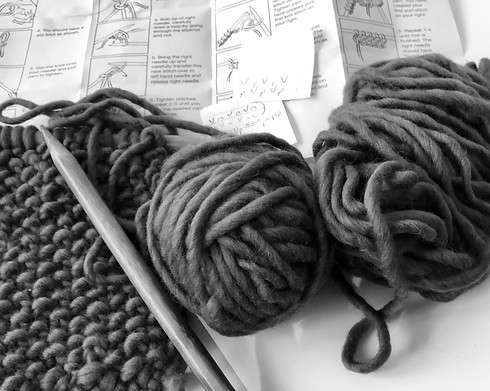
Benchmarking research showed that there are already knitting apps available. However, based on their functionalities, graphics, and terminology most of these are aimed at competent knitters rather than at beginners looking for tutorials. Apps with counting functionalities were either very basic or showed bad Usability. Based on this information key questions framing the design challenge was formulated:
-
How might we improve the learning experience of novice knitters?
-
How might we enhance the positive effect and experience of knitting?
-
How might we support novice knitters to finish their first project(s)?
CONCEPT


INFORMATION ARCHITECTURE
Based on the clustered ideas a information architecture was created, first by sketching then digitally, which shows the main areas of the app, their hierarchy and how they are connected. Areas to document the learning journey, promote focus, knowledge exchange and experience sharing were identified.
As the Information architecture was revised several times during the following steps the first and latest versions can be seen on the left.


MOODBOARDS & FIRST SCREEN DESIGNS
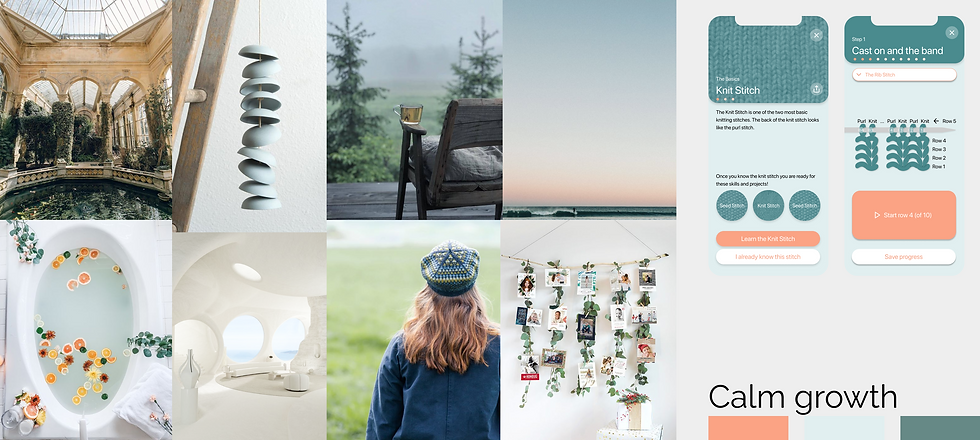
As a basis for the UI design three mood boards were done which symbolized relaxation, focus and learning in different ways. Two central screen were chosen and a rough design of these screens was created based on each of the three different mood boards. In the end the design "Natural Cosiness" was chosen as it worked best with knitted textures and portraying relaxation and comfort.
PROTOYPE
INTERACTIVE PROTOTYPES
The designed screens were used to create four compact prototypes in Figma with interactions as well as screen transitions and animations. Each of the prototypes is quite linear in ist interactivity to show how a user might use a certain area of the app rather than allowing to freely switch between different areas.
Date January - February 2021
Work by Ellen Schmucker
Created as a private project
Tools Figma
Methods Benchmarking, "How might we" questions, experience categories, brainwriting, clustering, information architecture, screen sketching, wireframing, component library, UI design, interactive prototyping